
Let us call you to clarify your needs together

Our team will contact you as soon as possible and together we will plan the most suitable solution for the process.

welvo

Ask your archive, get the answer

Welvo archives all of your email accounts on your own computer; you ask a question in natural language across thousands of messages and get the answer with cited sources. Your mail never leaves the cloud — even offline, your archive stays open.

Ask your archive, get the answer

Ask in plain language

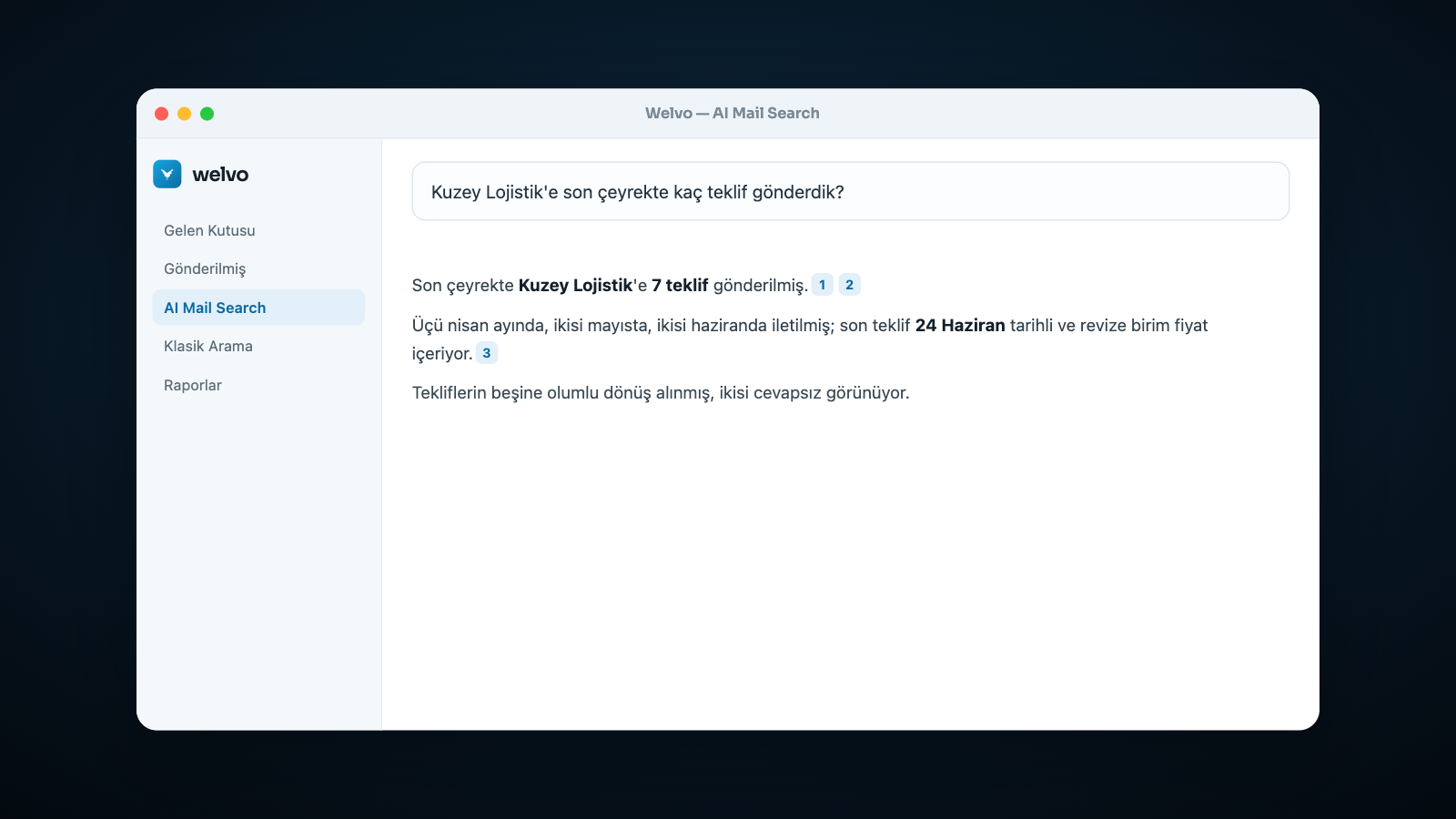
Type “How many quotes did we send to Northern Logistics last quarter?” and get a summarized answer.

Answers with sources

Every sentence is backed by numbered source emails; click one to open the original.

Your archive stays with you

Mail is stored on your own disk; it survives even if the server quota fills up.

Migrate and recover

Import Outlook PST/OST files and restore messages back to a server whenever you need to.

macOS and WindowsTurkish and EnglishSingle-file installationEmbedded or external PostgreSQL

Solution Summary

What is Welvo?

Welvo is a desktop application that archives your emails on your own computer and lets you ask the archive questions in natural language. It downloads your IMAP accounts along with attachments, offers AI-powered semantic search alongside classic keyword search, and links every answer back to the source emails. Data stays on the device; no cloud account is required to set it up.

Current challenges

  • In years of correspondence, “who did we send that quote to, and when?” takes minutes to answer
  • A departing employee’s knowledge disappears along with their mailbox
  • Old emails get deleted once the server quota fills up
  • Content inside PDF/Word attachments never shows up in search
The Welvo result

  • You ask the question in a sentence and the answer arrives with its sources
  • Institutional memory belongs to the archive, not to individual people
  • Mail deleted from the server stays in the local archive and can be restored if needed
  • Attachment content is indexed and searchable too
Features

Archiving, search and recovery — in one app

Every Welvo capability, in short.

Archiving

Multi-account sync

Add your IMAP accounts (Gmail, Outlook/Microsoft 365, Yahoo, Yandex, corporate servers) and download them folder by folder; new mail keeps syncing in the background.

Standard .eml storage

Every message is stored with its attachments in the open .eml format — never locked into a closed container, and exportable any time.

Local disk or NAS

The archive location can be a local disk or a network share (NAS); the setting is per device, while the database always stays local.

Outlook PST/OST import

Scans and previews old Outlook archives, then adds them as a separate account with your approval; the same message is never imported twice.

Restore to server

Restores local archive messages back to the same account (recovery) or a different one (migration); a dry run shows what will happen first.

Server-to-server transfer

Moves messages directly between two IMAP servers by folder, skipping duplicates.

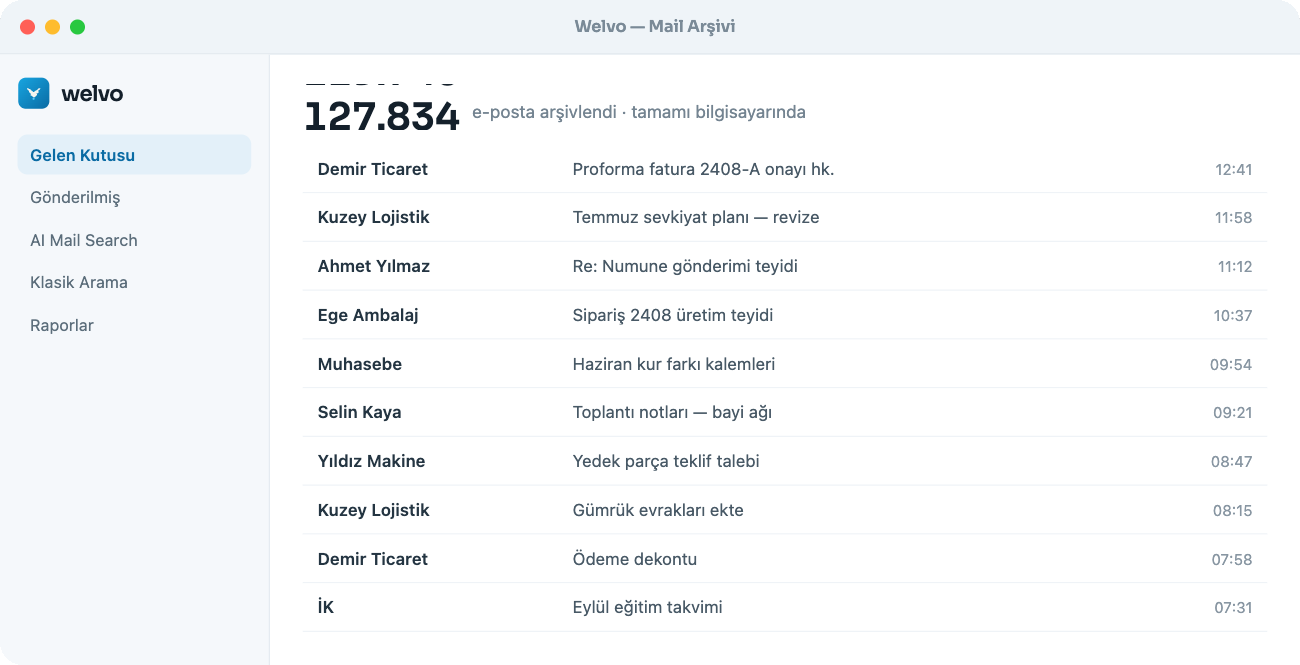
Welvo arşiv ekranı: hesaplar, klasörler ve indirilen e-posta listesi
All of your accounts live in one archive; the counter shows how many emails have been downloaded.

Search and AI

Classic search

Full-text search across subject, sender and body. Case- and Turkish-character-insensitive, no extra download required.

AI Mail Search (Q&A)

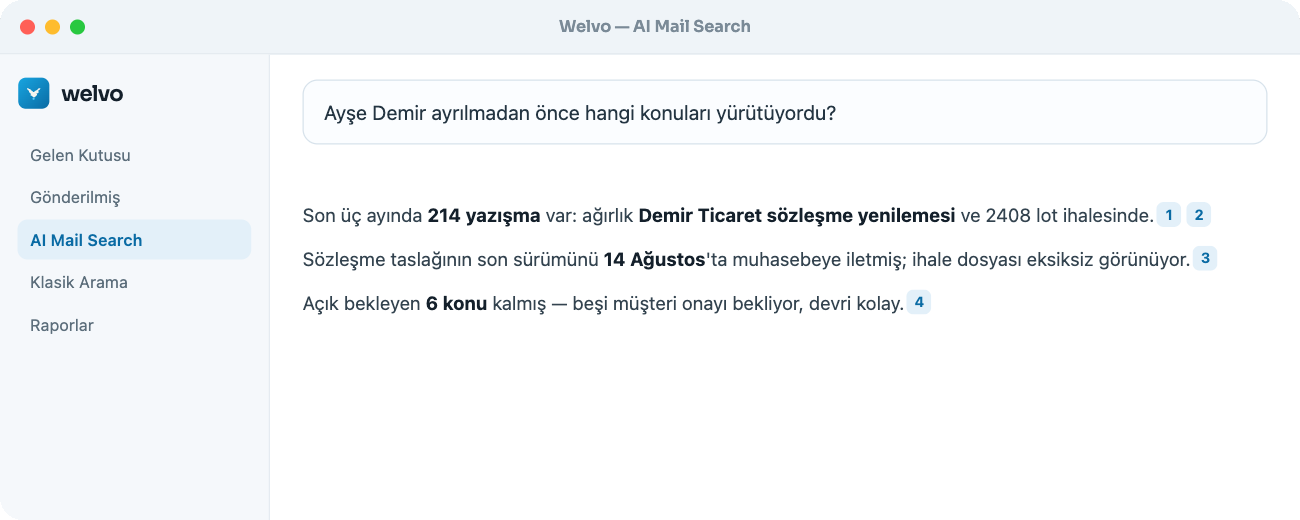
Ask sentences like “What was Jane Doe working on before she left?” — Welvo scans the archive and summarizes the answer.

Source-cited answers

Every answer lists the numbered emails it used; click one to open and verify the original.

Semantic search

Finds relevant emails even without an exact keyword match, using the bundled local model or your own server/cloud provider.

Result reranking

An optional second local model reorders candidate sources to improve answer accuracy.

Attachment indexing

Text inside PDF, Word and Excel attachments is extracted and made searchable; image attachments are described if a local model is installed.

Report generation

Say “put these threads into a table” and get results as an Excel, Word or PDF report.

Newsletter/marketing filter

Recognizes newsletters and marketing mail by their headers so you can exclude them from search and Q&A.

Favorites, notes and history

Star important emails, add private notes, and keep your chat history and generated reports on record.

Welvo AI Mail Search: ayrılan çalışanın yürüttüğü konuların kaynak gösterilen özeti
The numbers inside the answer are source emails — click one to open the original thread.

Enterprise use and security

Data stays on the device

Email content never leaves your computer by default. Connecting a cloud provider requires your explicit consent and a clear warning.

User and role management

Super admin and standard user roles with per-user account access and sharing — you decide who sees which archive.

Password vault and recovery codes

Account passwords are stored in the operating system’s credential vault; each account gets a single-use recovery code.

Embedded or external PostgreSQL

Works with a zero-setup embedded database, or connect your own PostgreSQL server if you prefer.

macOS and Windows

The same experience on both platforms; installation is a single file with no extra server or service required.

Turkish and English interface

Language is chosen on first launch, stored per user, and changeable from Settings.

How it works

A corporate email archive in 4 steps

From setup to your first answer.

01

Connect an account

Add your IMAP account with your email and app password; server settings auto-fill for known providers.

02

Let the archive download

Mail is downloaded to your computer with attachments and made searchable. This runs in the background.

03

Ask your question

Search by keyword, or ask AI Mail Search a sentence — the answer arrives with its source emails.

04

Report or restore

Turn the result into an Excel/Word/PDF report, or restore messages back to a server if needed.

Use cases

For businesses whose correspondence is their institutional memory

Anywhere email carries contracts, quotes and instructions.

Import/export and logistics

Find quotes, proformas, bills of lading and customs correspondence in seconds, even years later.

Accounting and tax advisory

Keep client correspondence and submitted documents in one archive, and show the source during an audit.

Legal and contract management

Trace which email a contract version came from, and who sent it, with the source attached.

Manufacturing and supply

Search order, deadline and lot correspondence together with the content of their attachments.

HR and handovers

Pull up what a departing employee was working on and their open items with a single question before handover.

SME operations

Never lose a message deleted when the server quota fills up — the archive stays with you.

Privacy

Your data stays with you — it isn’t a setting, it’s the architecture

Default: fully local

Archiving, search and Q&A run on your computer. Email content is never sent to a server; Welvo doesn’t require an account or an internet connection to work.

Optional: your own cloud

If you want a more powerful model, you can connect your own server or cloud provider. This happens through an explicit consent screen that states clearly what will be sent — the decision is always yours.

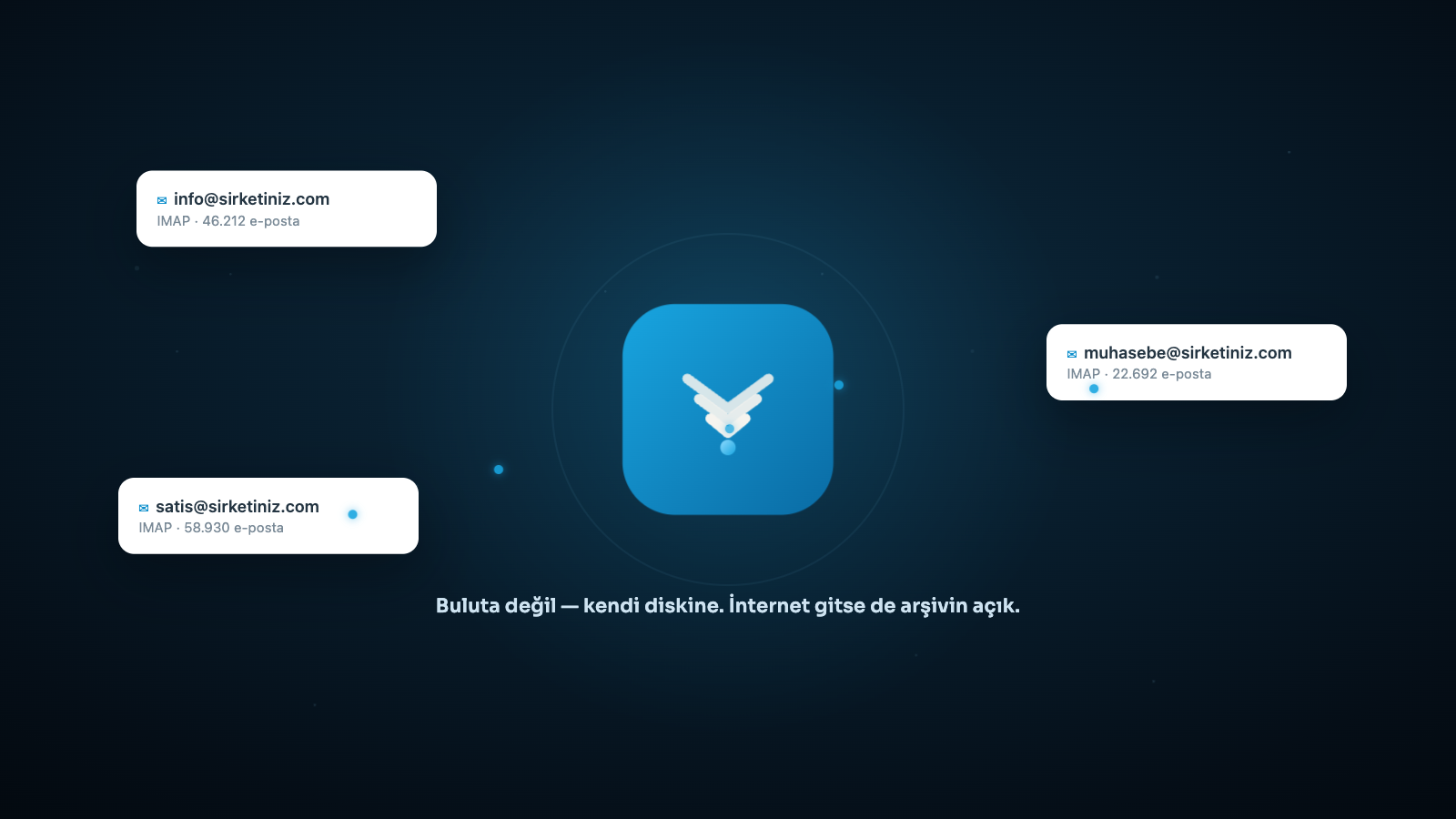
Welvo yerel arşiv: birden çok e-posta hesabı tek yerel arşivde toplanıyor
Accounts flow into a single local archive on your own disk, not into the cloud.

Note: Welvo is an archiving and search tool; data-protection compliance, retention periods and access rights are configured according to your organization’s policies. Per-user access and sharing controls support this.

Technical summary

At a glance

Product typeDesktop email archiving and search application
PlatformsmacOS (Apple Silicon) and Windows 10/11 (x64)
ProtocolIMAP (SSL/TLS); Gmail, Outlook/Microsoft 365, Yahoo, Yandex and corporate servers
Storage formatStandard .eml files + PostgreSQL directory (embedded or external)
Archive locationLocal disk or network share (NAS)
SearchFull-text (FTS) plus optional semantic search and reranking
AILocal model by default; your own server or cloud provider can be connected
Import/exportOutlook PST/OST import; restore to IMAP and server-to-server transfer
ReportingExcel (.xlsx), Word (.docx), PDF
Interface languagesTurkish, English
LicensingDevice license + user seat
Runs locallyCites its sourcesImports PSTRestores to serverSupports NASExcel/Word/PDF reports

Frequently asked questions

The most common questions about Welvo, answered briefly.

What does an email archiving program do?

It stores your emails on your own device, independent of the server. When the server quota fills up or an account is closed, nothing is lost — you can still search, report, and restore to a server when needed.

Does Welvo send my data to the cloud?

No. Archiving, search and Q&A run on your computer by default. Content is only sent to a cloud provider if you explicitly consent and connect one yourself for that specific action.

How does AI-powered email search work?

You write your question as a sentence. Welvo searches the archive for relevant correspondence, summarizes the answer, and numbers the emails it used. You can click any citation to verify it.

Can I import my Outlook PST files?

Yes. Welvo scans the PST/OST file, previews how many folders and messages it contains, and adds it as a separate archive account with your approval. The same message is never imported twice.

Can I restore deleted emails to the server?

Yes. You can restore from the local archive to the same account (recovery) or a different one (migration). A dry run shows what will be uploaded before anything happens.

Is the content of attachments searchable too?

Yes. Text inside PDF, Word and Excel attachments is extracted and made searchable; image attachments are indexed along with their content if a local description model is installed.

How many users can use it?

The installation runs on a device license, and each user takes one seat. The super admin adds users, sets roles, and manages which account is visible to whom.

Does it work without an internet connection?

Your archive and search work fully offline. Internet is only needed to download new mail from the server and for optional model downloads.

How long does setup take?

The app installs from a single file and ships with an embedded database, so no separate server setup is needed. How long the archive takes to download depends on the size of your mailbox, and it runs in the background.

Let’s set up Welvo for your business

Let’s work out together how many accounts to archive, your retention period and user count — we’ll handle the setup.